Call recording
Recordings in Exovo stay on your hardware, are searchable from the console, and can carry consent prompts where the law requires them.
What gets recorded
- Every call is recorded per user — one setting, on the user, covers their calls whichever way they arrive: dialled direct, forwarded to them, placed by them, or answered from a queue or a ring group. For a queue or ring-group call the decision is made when somebody answers, from that person's own setting, so only the people who record are recorded; recording starts a moment after they pick up rather than while the caller is still on hold.
- Who can see them — users with the Show recordings permission see their own recordings under Recordings in the web client and the apps. Without it the page says so — the calls are still recorded, the person just cannot see them.
- On demand — a Record control in the Exovo app starts and stops recording on the live call. Per-user recording permissions govern who can record and who can play back or delete their own recordings.
The recordings library
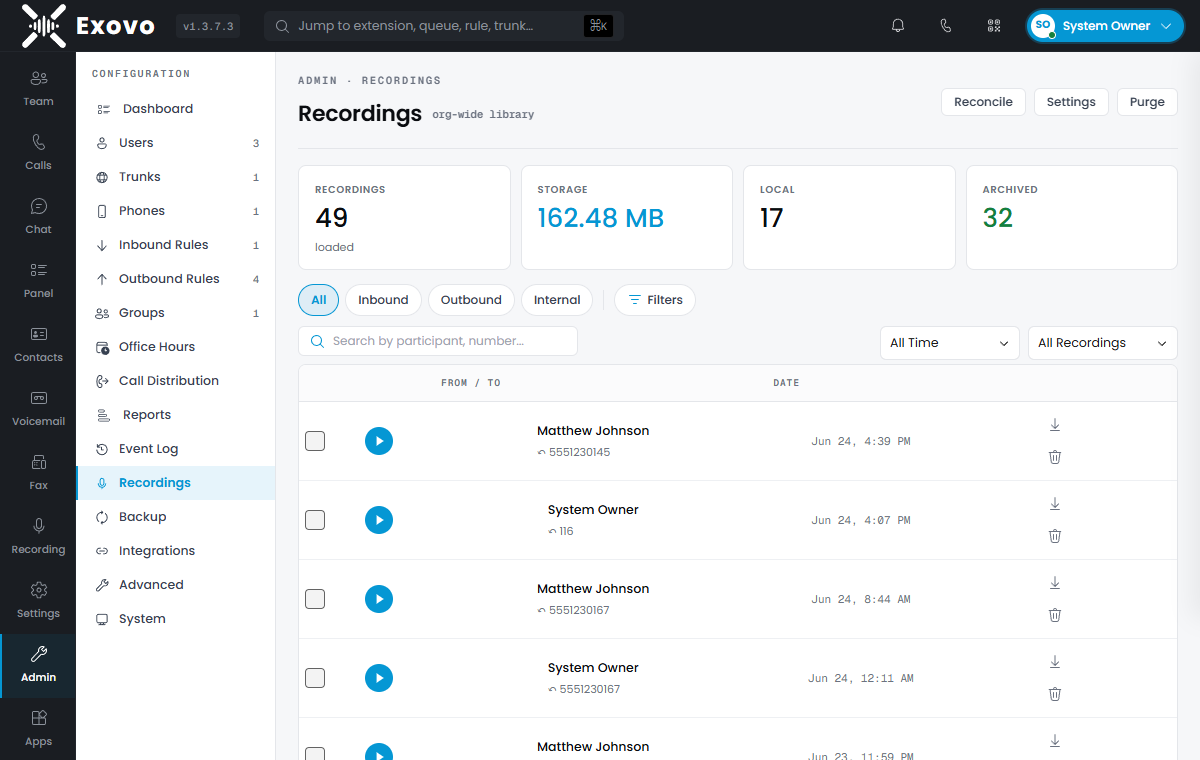
Admin → Recordings is the org-wide library: filter by direction (inbound/outbound/internal),
date range, participant or number, and local vs archived location. Each entry plays inline,
downloads as a .wav, or deletes; bulk selection covers archive and delete operations across a
filtered set.
Users' own Recordings page in the web client shows just the calls they were a party to, gated by their Show recordings permission; the org-wide library is Office › Recordings, an administrator view. A 3CX import carries each user's show and delete recording rights across.
Recordings elsewhere in the system
- CRM journaling can attach a signed, expiring playback link to the CRM contact's call record — see call journaling.
- Transcription turns recordings into searchable text.
- Storage and retention — quotas, archival to remote storage and auto-deletion are covered in storage and archiving.
Compliance notes
Consent rules for recording vary by jurisdiction (one-party vs all-party consent). Exovo does not play a consent prompt to the caller — if your jurisdiction requires one, put it in the queue's intro prompt or the user's greeting. Make sure internal policy covers the agent side, and use retention (auto-delete) to avoid keeping recordings longer than policy allows.